
WordPress Security Hardening Without a Bloated Security Plugin
Change the login URL, disable XML-RPC, restrict the REST API, hide your WordPress version, and redirect logins by user role. Every control sits in one panel. It’s not a firewall, so you skip the scanning overhead, and you don’t touch functions.php or stack five plugins to get there.
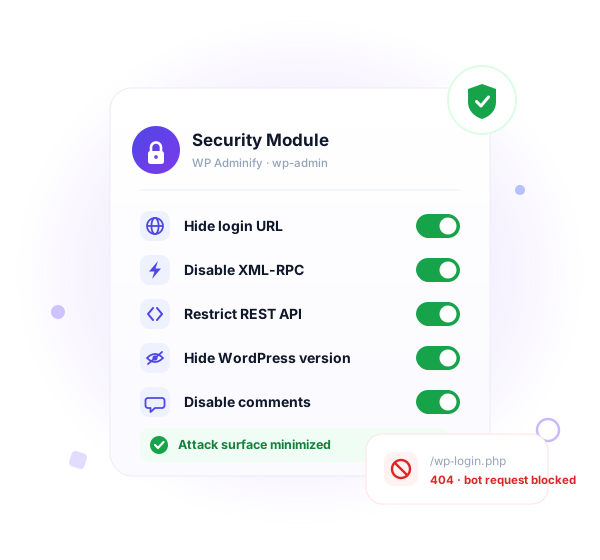
Default WordPress hands attackers a map
A fresh install advertises its version, exposes its login page, and leaves XML-RPC wide open. None of this is a bug. WordPress ships these defaults for convenience, not for hardening. Here are six places it leaks.
What security feature does WP Adminify offer?
Managing security is not that complicated. Use secure hosting and follow some basic rules of WordPress, like always using the latest version of WordPress, Themes, Plugins and at the same time enable our security features by WP Adminify.
Redirect URLs
Change WordPress default login and register URL, plus redirect users to a specific admin page or URL based on user login or log out. Define the user role, user name, and even the capability to redirect users.


Header Security
Secure your WordPress site header information like WordPress Generator version, Shortlink, EditURI, and much more. With this option, you can hide your default information and make it hard for users to detact your WordPress version plus your used theme and plugins version.
Feed Links
WordPress by default provides an RSS Feed for your published blog posts and comments. If you are a user who never uses RSS Fee,d then disabling this feature can enhance your server performance a little bit.


REST API
Most of the basic corporate business websites, static websites, local service providers, personal blogs, small nonprofits and some other website owners don’t need the REST API functionality because they don’t connect other apps to the website. Get the control to enable or disable this feature to add an extra layer security on your Dashboard.
Disable Comments
Disable the entire or partial comments functionality in your WordPress website. You can hide comments for the frontend, plus the backend. You have control over whatever you prefer to do with the WordPress Comments.


Post & Archives
We have some dedicated options posts and archives settings. You can display your last update date in the frontend and it supports any theme.
Custom Gravatar Images
Define some custom gravater images and make your users profile look interesting just like your Dashboard. Upload as many Gravatar images as you want and this will be applied in the discussion.

How It Works
Harden your WordPress site in minutes
Every control lives in one Security tab inside WP Adminify. No config files to edit and no extra plugin per setting.
From the WP Adminify Security tab
One panel, grouped toggles, changes apply on save.
Harden in the right sequence
Some changes can lock you out if rushed. Do them in this order.
Every setting is a single toggle, and every toggle is reversible. Nothing here touches WordPress core files.
Role-based login redirects. Most security plugins skip this.
A login-URL plugin moves the door. WP Adminify also decides where each role goes once they walk through it: by user role, by username, or by capability.
Send each role exactly where it belongs after login.
Administrators land on the dashboard. Editors drop straight into the Posts list. Clients and customers go to a custom page instead of the raw wp-admin screen. Logout sends everyone back to the front end instead of the bare login form.
Configure it once in Security → Redirect URLs. You can target a redirect by role, by specific username, or by capability. No login_redirect filter and no custom function required.
What you can scope per role
Comparison
WP Adminify vs other WordPress security Plugins
How the Security module compares with WPS Hide Login, a full firewall plugin like Wordfence, hand-written code, and default WordPress.
| Capability | WP Adminify Pro | WPS Hide Login | Wordfence | Manual / Code |
|---|---|---|---|---|
| Change login URL | ✓ Yes | ✓ Yes | ✗ No | ~ Complex |
| Role-based login redirects | ✓ By role, user, capability | ✗ No | ✗ No | ~ Custom filter |
| Disable XML-RPC | ✓ One toggle | ✗ No | ~ Firewall rule | ~ Filter / .htaccess |
| Restrict REST API | ✓ Logged-in only | ✗ No | ~ Partial | ~ Custom filter |
| Hide WP version & clean head | ✓ Yes | ✗ No | ✗ No | ~ Multiple hooks |
| Disable comments globally | ✓ Yes | ✗ No | ✗ No | ~ Custom code |
| Heartbeat & feed control | ✓ Yes | ✗ No | ✗ No | ~ Custom code |
| Firewall & malware scanning | ✗ Not a firewall | ✗ No | ✓ Yes | ✗ No |
| Replaces multiple plugins | ✓ 60+ features in one | ✗ Login only | ✗ Security only | ~ |
⚠ Read this before you flip these switches
Hardening controls change how WordPress responds to requests. Three of them have dependencies, and knowing that up front saves you a lockout or a broken integration.
Changing the login URL can lock you out
Once you set a custom login slug, /wp-login.php and /wp-admin (when logged out) stop showing the form. If you forget the new slug, you can’t log in through the browser.
Stay safe:
- Save the new login URL in your password manager before you log out
- To recover, deactivate WP Adminify via WP-CLI (
wp plugin deactivate adminify) and the defaultwp-login.phpreturns - Or rename the plugin folder over SFTP; WordPress disables it and restores the standard login
XML-RPC powers Jetpack and the WordPress mobile app
Disabling XML-RPC blocks amplified brute force and pingback abuse, but it also breaks Jetpack, the WordPress iOS and Android app, and trackback/pingback features. If you rely on any of those, leave XML-RPC on and harden the login URL instead.
The REST API is required by the block editor
Gutenberg, many plugins, and headless front ends all use the REST API. Don’t fully disable it. Choose restrict to logged-in users instead. Authenticated editors keep full functionality, and anonymous requests like /wp-json/wp/v2/users get a 401.

“The plugin is stable and does not affect performance, which is a significant advantage. ”

@gdimitrov
WordPress.org
“This plugin is very great: works fine, gives a very nice look to the WordPress Dashboard”

@peopleinside
WordPress.org
“This plugin lets me transform the UI, user-friendly, and fast, essential for a modern website backend.“

Sascha Donelasci
Web Design Agency
“Support has been responsive and helpful, truly putting the customer first” , a rare quality these days.

Louis J Gleason
Developer & Creator
“I am totally blown away with all that WPAdminify can do! ALREADY WAY BEYOND EXPECTATIONS!!”

@shezoom
Startup
“Lot of functionalities and ability to, customize admin & login on WordPress, active support & updates.”

@Myllio
WordPress.org
- Yearly
- Lifetime
Save Page
Save Page
Save Page
Save Bunlde Pricing Page
Save Page
Save Page
Save Page
Save Bunlde Pricing Page
- Yearly
- Lifetime
Save Page
Save Page
Save Page
Save Page
Save Page
Save Page
Frequently Asked Question (FAQ)
Questions people actually ask about WordPress Security
Get Started with WP Adminify Today
We offer the best WordPress Dashboard Customization and maintenance feature to our users.
Rebrand the admin panel of personal or clients Dashboard within minutes.