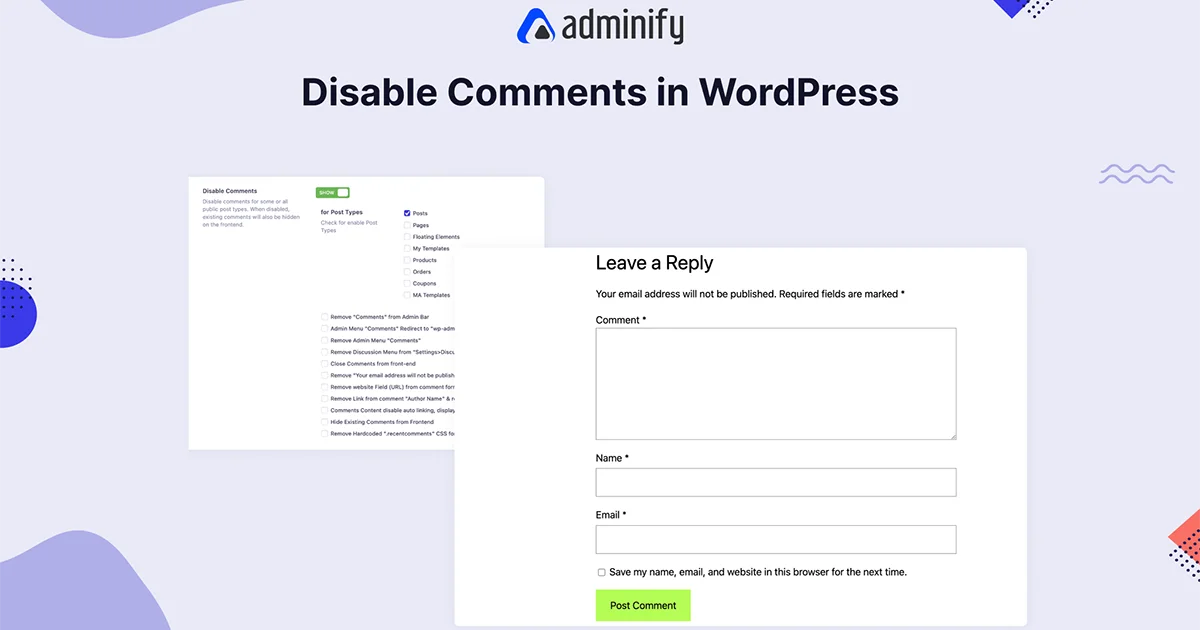
Disable Comments in WordPress
Reduce spam, enhance security, Performance, and Branding
Comments may be irrelevant for some corporate business websites. Hackers sometimes inject malicious scripts via the comment form. If you don’t maintain the comment properly, it’s better to deactivate the comment system. Here, WP Adminify can help you to organize your comment options.

How to disable comments in WordPress?
Explore the easiest way to control your comment visibility in the frontend of backend. WP Adminify offers an intuitive and easy control panel that can help you get rid of spammers and improve performance.
Disable Comments on Posts or Any Post Type
Your available post types will appear on our system; just select where you would like to disable your comments functionality and save the settings. You can overwrite existing comment settings with our disable comments option.


Remove Comments from the Admin Bar
When you take a look at your WordPress Admin Bar, you will notice a simple comment icon. Clicking on this icon redirects users to the comment publishing panel. Prevent accidental access to the comment option from your default admin bar comment icon.
Remove “Comments” Admin Menu
When you want to disable comments from your site, keeping the comments menu in your Admin panel seems unnecessary. This can be destructive for your editor.


Remove Discussion Option
When you navigate to Settings on your Dashboard, you will notice there is a discussion option available. This option panel is used to organize your website comment settings. Admin can manage post settings, comment settings, comment pagination, comment moderation, disallowed comment keys, and much more on this option.
Remove “Note” from Comment Form
By default, WordPress adds a “Note” field to comment forms, which may not always be necessary. WP Adminify allows you to remove this field for a cleaner form layout.


Remove Website URL from Comment Form
One of the most demanding features that prevent spam and keep your discussion valuable. When you keep the website URL field available, many spammers try to post comments with their website URL to achieve a backlink.
Hide Existing Comments from the Frontend
If you already have too many spam comments and want to get rid of them instantly, you are just one click away. Our plugin will help you to hide all existing comments from your frontend without deleting them on your Dashboard. You can gradually check each comment and delete it later.


“The plugin is stable and does not affect performance, which is a significant advantage. ”

@gdimitrov
WordPress.org
“This plugin is very great: works fine, gives a very nice look to the WordPress Dashboard”

@peopleinside
WordPress.org
“This plugin lets me transform the UI, user-friendly, and fast, essential for a modern website backend.“

Sascha Donelasci
Web Design Agency
“Support has been responsive and helpful, truly putting the customer first” , a rare quality these days.

Louis J Gleason
Developer & Creator
“I am totally blown away with all that WPAdminify can do! ALREADY WAY BEYOND EXPECTATIONS!!”

@shezoom
Startup
“Lot of functionalities and ability to, customize admin & login on WordPress, active support & updates.”

@Myllio
WordPress.org
- Yearly
- Lifetime
Save Page
Save Page
Save Page
Save Bunlde Pricing Page
Save Page
Save Page
Save Page
Save Bunlde Pricing Page
- Yearly
- Lifetime
Save Page
Save Page
Save Page
Save Page
Save Page
Save Page
Get Started with WP Adminify Today
We offer the best WordPress Dashboard Customization and maintenance feature to our users.
Rebrand the admin panel of personal or clients Dashboard within minutes.