
Speed Up Your WordPress Admin Without a Caching Plugin
Control the Heartbeat API, disable embeds, strip Dashicons and jQuery Migrate, and turn off Gutenberg site-wide. Every wp-admin performance control sits in one panel. It’s not a caching plugin, so there’s no page cache to flush, and you don’t edit functions.php to get a faster dashboard.
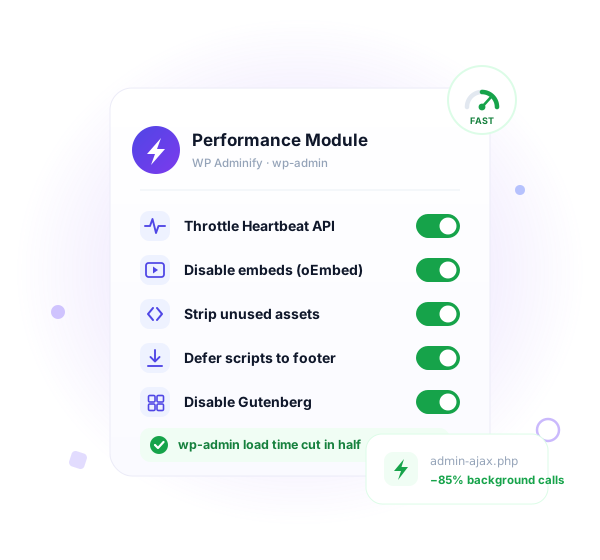
Everyone optimizes the front end. wp-admin stays slow.
You cache pages, lazy-load images, and chase a green PageSpeed score. Then you open the dashboard and it crawls. WordPress ships no admin performance settings at all. Six reasons the back end drags.
What Performance features do you get?
We always care about our frontend pagespeed, but hardly do optimization in our WordPress Dashboard. WP Adminify plugin brings some option that can be optimized and boost your Dashboard performance.
Disable Embeds
Speed up your WordPress custom dashboard by blocking oEmbed options,and disabling embeds across the TinyMCE editor and REST API. Create a faster, more secure WordPress dashboard while keeping your dashboard clean and optimized.


Enhance Dashboard Performance
Boost your custom WordPress dashboard by removing Dashicons for public visitors, eliminating Gravatar query strings, and moving JavaScript to the footer. WP Adminify helps you customize dashboard performance so your WordPress client dashboard stays fast, lightweight, and responsive.
Control WordPress Heartbeat API
Optimize your custom dashboard by controlling WordPress Heartbeat API settings. Reduce server load, manage autosave intervals, and prevent excessive admin-ajax.php requests. Create a Client-ready Dashboard without interruptions.


Disable WordPress Gutenberg
Take full control of your WordPress dashboard by removing Gutenberg scripts and styles site-wide. Restore the Classic Editor or your preferred page builder. Advanced editing for your WordPress dashboard, and a fully customized dashboard experience for all users and post types.
How It Works
Tune wp-admin performance in minutes
Every control lives in one Performance tab inside WP Adminify. No config files to edit and no extra plugin per tweak.
From the WP Adminify Performance tab
One panel, grouped toggles, changes apply on save.
Optimize in the right sequence
Some tweaks have dependencies. Work through them this way.
Every setting is a single toggle, and every toggle is reversible. Nothing here touches WordPress core files.
Per-context Heartbeat control. Most plugins give one switch.
A typical Heartbeat plugin lets you slow or kill the API everywhere. WP Adminify splits it by context, so you keep what each screen actually needs and cut the rest.
The dashboard, the editor, and the front end are not the same.
The post editor genuinely needs Heartbeat for autosave and post-locking, so keep it there at a sensible interval. The dashboard rarely needs frequent polling, so slow it down. The front end almost never needs it, so switch it off entirely.
Set all three in Performance → Heartbeat. One blunt site-wide switch either breaks autosave or leaves load on the table. Per-context control gives you both speed and a working editor.
What you can tune per context
Comparison
WP Adminify vs other WordPress performance tools
How the Performance module compares with Heartbeat Control, an asset optimizer like Perfmatters, hand-written code, and default WordPress.
| Feature | WP Adminify Pro | Heartbeat Control | Perfmatters | Manual / Code |
|---|---|---|---|---|
| Heartbeat API control | ✓ Yes | ✓ Yes | ✓ Yes | ~ Custom filter |
| Per-context Heartbeat (dashboard/editor/front) | ✓ Yes | ✗ Limited | ✗ Limited | ~ Custom code |
| Disable embeds (oEmbed) | ✓ Yes | ✗ No | ✓ Yes | ~ Multiple hooks |
| Remove Dashicons & jQuery Migrate | ✓ Yes | ✗ No | ✓ Yes | ~ Custom code |
| Disable Gutenberg site-wide | ✓ Yes | ✗ No | ✓ Yes | ~ Separate plugin |
| Move scripts to footer | ✓ Yes | ✗ No | ✗ No | ~ Custom code |
| Front-end page caching | ✗ Not a cache plugin | ✗ No | ✗ Performance only | ✗ No |
| Replaces multiple plugins | ✓ 60+ features in one | ✗ Heartbeat only | ~ |
⚠ Read this before you flip these switches
Performance tweaks change what WordPress loads and when. Three of them have dependencies, and knowing that up front saves you a broken editor or a styling glitch.
Disabling Gutenberg breaks block themes and Full Site Editing
Block themes (Twenty Twenty-Two and newer defaults) and Full Site Editing rely on the block editor. If your theme is a block theme, don’t disable Gutenberg, because the Site Editor and theme templates depend on it. This setting is for sites on the Classic Editor or a page builder like Elementor or Bricks.
Removing jQuery Migrate can break older plugins
jQuery Migrate patches deprecated jQuery calls. Some older themes and plugins still depend on those calls. After removing it, click through your site with every plugin active. If something breaks, re-enable jQuery Migrate and update or replace the offending plugin.
Don’t fully disable Heartbeat in the editor
Heartbeat powers autosave and post-locking. If you switch it off entirely in the post editor, you lose autosave, and two authors can overwrite each other’s work. Throttle the editor interval instead of disabling it. Disabling Heartbeat on the front end is safe.

“The plugin is stable and does not affect performance, which is a significant advantage. ”

@gdimitrov
WordPress.org
“This plugin is very great: works fine, gives a very nice look to the WordPress Dashboard”

@peopleinside
WordPress.org
“This plugin lets me transform the UI, user-friendly, and fast, essential for a modern website backend.“

Sascha Donelasci
Web Design Agency
“Support has been responsive and helpful, truly putting the customer first” , a rare quality these days.

Louis J Gleason
Developer & Creator
“I am totally blown away with all that WPAdminify can do! ALREADY WAY BEYOND EXPECTATIONS!!”

@shezoom
Startup
“Lot of functionalities and ability to, customize admin & login on WordPress, active support & updates.”

@Myllio
WordPress.org
- Yearly
- Lifetime
Save Page
Save Page
Save Page
Save Bunlde Pricing Page
Save Page
Save Page
Save Page
Save Bunlde Pricing Page
- Yearly
- Lifetime
Save Page
Save Page
Save Page
Save Page
Save Page
Save Page
Frequently Asked Question (FAQ)
Questions people actually ask about WordPress Admin Performance
Get Started with WP Adminify Today
We offer the best WordPress Dashboard Customization and maintenance feature to our users.
Rebrand the admin panel of personal or clients Dashboard within minutes.