
White Label WordPress So Clients See Your Branding
Replace the WordPress logo, the “Howdy” greeting, the admin footer, and the wp-login screen with your own brand. One plugin rebrands every screen a client touches. No code, no functions.php edits, and it’s role-based, so only the users you pick see the change.
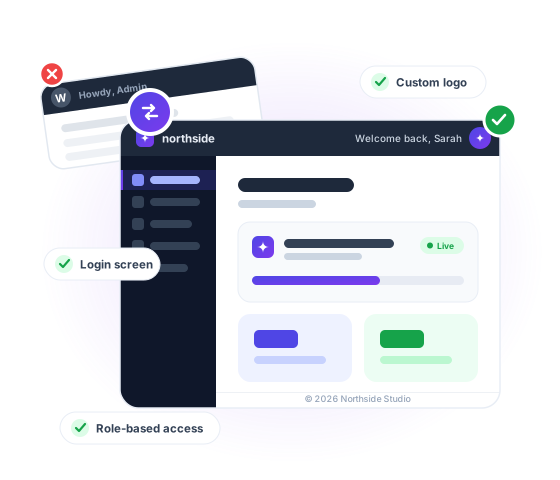
You built the site. So you should take the credit.
You spend weeks building a polished site for a client, then hand them a dashboard that still screams “generic WordPress install.”
White Label WordPress Features That Help You Deliver a Premium Client Experience
Want your client dashboard to feel clean, premium, and fully on-brand? These white label features help you remove WordPress clutter, customize the admin experience, and deliver a backend that feels polished, professional, and built by your agency.
Customize the Admin Footer with Your Brand
Replace generic WordPress footer text with your own brand message, support details, or client-facing notes to make every login feel more professional.


Show Only the Admin Footer Elements You Want
Keep the dashboard distraction-free by showing only the footer links and details that matter to your team or your clients.
Remove the Default Howdy Message for a Cleaner Brand Experience
Swap WordPress default greetings for a cleaner, more polished admin experience that feels tailored to your brand.


Custom Login Page for WordPress White Label
Design a professional login screen with a custom login page. Use your colors, logo for admin areas, and branding to offer a seamless entry to your custom dashboard and client dashboard.
Custom Dashboard
Create a fully customizable WordPress admin dashboard with WP Adminify. Rearrange widgets, add important updates, and optimize dashboard layout for a streamlined experience.


Admin Menu Customization
Simplify navigation with WordPress menu management options. Modify, hide, or reorder admin menus to deliver an intuitive WordPress dashboard for different user roles.
User Role Management
Manage user access smartly by assigning permissions based on roles. Customize dashboard visibility, secure sensitive settings, and improve WordPress dashboard customizations for clients and internal teams.


Login URL Customization
Secure and brand your site by customizing the login URL. Add your brand identity and protect the WordPress client dashboard. Hide the default login path from crawlers and unauthorized access.
Enhanced User Experience
Deliver a professional and fully branded WordPress admin layout. Remove distractions, boost usability, and ensure your dashboard provides a seamless experience overall.

How It Works
White label WordPress in under 5 minutes
Skip functions.php entirely. Brand the dashboard and the login screen from one settings panel.
Brand the admin area
Everything your client sees after they log in.
Brand the login screen
The first touchpoint, before anyone reaches the dashboard.
One rule: the new file must match the original’s MIME type. JPG → JPG. PDF → PDF. To change format, upload as new media.
Most “white label” plugins stop at the logo.
Real white labelling means every screen carries one brand: login, dashboard, admin bar, footer.
WP Adminify covers all of them in a single plugin.
One plugin, every branded touchpoint
Logo-only tools leave the “Howdy” text, the version string, and the wordpress.org login link untouched. Clients still see the seams. WP Adminify closes all of them, role by role, so your team keeps the native WordPress they need for maintenance.
Branding lives in the same plugin as your admin menu, dashboard, and security settings. That’s one plugin to update instead of five, and five fewer chances for a conflict.
What complete white label covers
Comparison
WP Adminify vs White Label CMS vs custom code
White Label CMS handles basic branding.
Custom code handles anything, until WordPress updates and you’re back in functions.php. Where each one falls short (full breakdown in our WP Adminify vs White Label CMS comparison):
| Capability | WP Adminify | White Label CMS | Custom Code |
|---|---|---|---|
| Custom admin & login logo | ✓ Yes | ✓ Yes | ~ Hooks required |
| Separate light & dark mode logos | ✓ Yes | ✗ No | ~ Complex |
| Rewrite “Howdy” & footer text | ✓ Yes | ✓ Yes | ~ Filters required |
| Role-based branding | ✓ Per role | ✗ Limited | ~ Custom checks |
| Branding cleanup (widgets, version, panel) | ✓ Built in | ✗ Partial | ~ Many snippets |
| Admin menu + dashboard customization | ✓ Included | ✗ No | ~ Not possible without more code |
| Survives WordPress core updates | ✓ Yes | ✓ Yes | ✗ Breaks / needs review |
| All-in-one plugin (no bloat) | ✓ 60+ features | ✗ Branding Only | ✗ N/A |
White label WordPress without a plugin
You can hand-code branding in functions.php. Here’s the catch, and why a settings panel wins for client work. The hooks, the trade-offs, and the agency workflow are covered in the white label WordPress guide.
// functions.php, the manual way // Replace the login logo add_action(‘login_head’, function() { echo ‘‘; }); // Point the logo at your own site add_filter(‘login_headerurl’, function() { return ‘https://yoursite.com’; }); // Rewrite the “Howdy” greeting add_filter(‘admin_bar_menu’, function($bar) { // …node lookup + str_replace… }, 25); // Replace the admin footer add_filter(‘admin_footer_text’, function() { return ‘© 2026 Your Agency’; });Why the GUI wins for client sites
- No code to audit after each WordPress core update
- Role-based branding without writing capability checks
- Visual preview before changes go live to clients
- Revert in one click, no hunting through functions.php
- Every site you manage uses the same settings panel
See the official filters: login_headerurl and admin_footer_text in the WordPress Developer Resources.

“The plugin is stable and does not affect performance, which is a significant advantage. ”

@gdimitrov
WordPress.org
“This plugin is very great: works fine, gives a very nice look to the WordPress Dashboard”

@peopleinside
WordPress.org
“This plugin lets me transform the UI, user-friendly, and fast, essential for a modern website backend.“

Sascha Donelasci
Web Design Agency
“Support has been responsive and helpful, truly putting the customer first” , a rare quality these days.

Louis J Gleason
Developer & Creator
“I am totally blown away with all that WPAdminify can do! ALREADY WAY BEYOND EXPECTATIONS!!”

@shezoom
Startup
“Lot of functionalities and ability to, customize admin & login on WordPress, active support & updates.”

@Myllio
WordPress.org
- Yearly
- Lifetime
Save Page
Save Page
Save Page
Save Bunlde Pricing Page
Save Page
Save Page
Save Page
Save Bunlde Pricing Page
- Yearly
- Lifetime
Save Page
Save Page
Save Page
Save Page
Save Page
Save Page
White labeling works on any WordPress site and touches only the back end, your visitors see nothing different, while everyone who logs in sees your brand instead of WordPress. Combine it with the admin menu editor to hide menus your clients shouldn’t touch, and the finished dashboard looks purpose-built rather than assembled from plugins.
White Label WordPress FAQs
We have mentioned some questions and our answers for WordPress white label.
Get Started with WP Adminify Today
We offer the best WordPress Dashboard Customization and maintenance feature to our users.
Rebrand the admin panel of personal or clients Dashboard within minutes.