
WordPress Dashboard Dark Mode: Easy Toggle, Schedule & OS Aware
Improve focus, accesibility and be productive in Dark Environment
WordPress dark mode has never been easier. Compatible with all themes and plugins, WP Adminify’s dark mode gives you a modern look that goes easy with the eye.

Feeling strained by bright admin during late-night?
WP Adminify turns your Dashboard dark mode based on your preference. Get rid of eye strain and enjoy your modern WordPress Dashboard in dark mode.
Quick Dark Mode Switcher
Switch your WordPress custom dashboard to dark mode in a single click. Instant switching between light and dark themes without disrupting your workflow or refreshing your page.

OS-Based Color Mode
Now you can synchronize your WordPress dashboard with your device’s color settings automatically. Enjoy a consistent dark mode experience on any device, whether on Windows, macOS, or mobile.
Schedule Dark Mode
Want a dynamic scheduling for dark mode? Now you can with WP Adminify. Less eye strains while working late hours.


WooCommerce Compatible
WP Adminify’s dark mode is completely WooCommerce compatible. Best for dark-themed stores where you constantly need to work with different themes in frontend and backend.
Mode Based Custom Logo Upload
Maintain branding across light and dark themes by setting a custom logo for each mode. Strengthen your WordPress custom dashboard’s identity for clients and teams. Now you can add custom logo designs for light/dark mode. Keep your brand value intact while changing modes. No more broken logos when switching to dark mode.


100 Percent Compatible With WordPress Themes and Plugins
Enable dark mode without compatibility worries. This feature ensures that your WordPress dashboard customizations work smoothly with any WordPress themes and plugins.
Default WordPress Editor Support
Enable dark mode even in WordPress editors. Enjoy global compatibility without broken elements with WP Adminify’s dark mode.

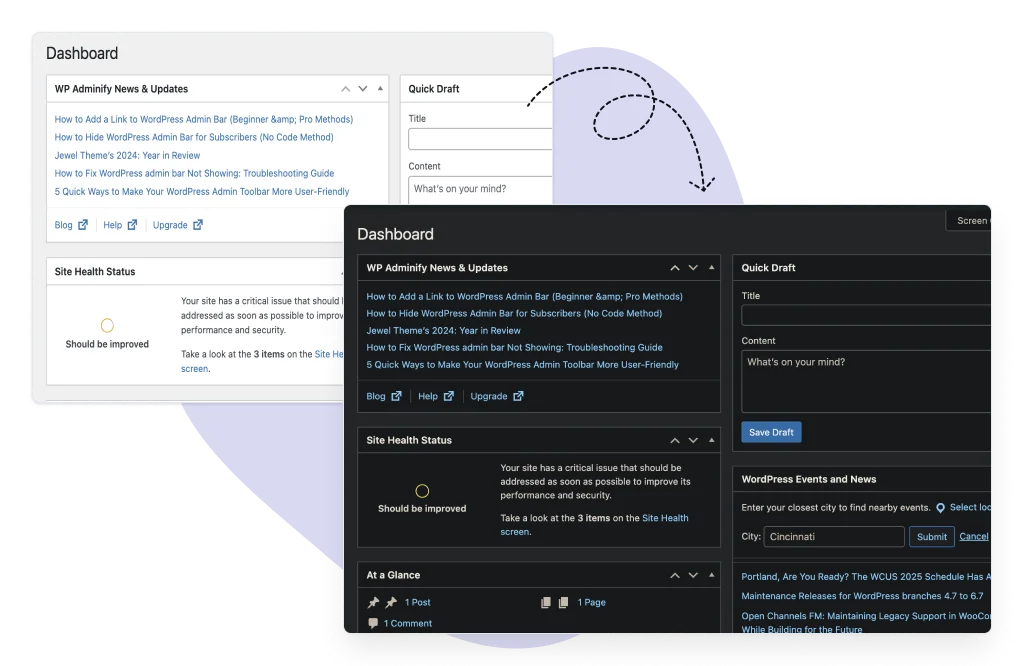
Default WP Admin Dark Mode support
You don’t have to use the Adminify UI to get dark mode. It works with your Default WordPress Dashboard. Disable the adminify ui from the customization option to stay with the default WordPress interface.

“The plugin is stable and does not affect performance, which is a significant advantage. ”

@gdimitrov
WordPress.org
“This plugin is very great: works fine, gives a very nice look to the WordPress Dashboard”

@peopleinside
WordPress.org
“This plugin lets me transform the UI, user-friendly, and fast, essential for a modern website backend.“

Sascha Donelasci
Web Design Agency
“Support has been responsive and helpful, truly putting the customer first” , a rare quality these days.

Louis J Gleason
Developer & Creator
“I am totally blown away with all that WPAdminify can do! ALREADY WAY BEYOND EXPECTATIONS!!”

@shezoom
Startup
“Lot of functionalities and ability to, customize admin & login on WordPress, active support & updates.”

@Myllio
WordPress.org
- Yearly
- Lifetime
Save Page
Save Page
Save Page
Save Bunlde Pricing Page
Save Page
Save Page
Save Page
Save Bunlde Pricing Page
- Yearly
- Lifetime
Save Page
Save Page
Save Page
Save Page
Save Page
Save Page
Does WordPress admin dark mode change your website too?
No. WordPress has no built-in dark mode for the admin area, so it takes a plugin, and WP Adminify darkens the dashboard only. Your theme and your public pages are untouched. You can switch it on a schedule, follow your operating system setting automatically, or let each user choose, and it covers the block editor and WooCommerce screens.
That distinction catches people out, because most plugins with dark mode in the name do the opposite: they restyle the front end for visitors and leave wp-admin white. If you are searching for admin dark mode, you are almost certainly the person editing at 11pm, not the person browsing the site. Those are two different features and it is worth checking which one you are installing.
The half-finished version is the other common disappointment. A dark sidebar with a blinding white block editor is worse than no dark mode at all, because the contrast jump happens every time you open a post. Coverage matters more than the toggle: the editor, the media library, the plugins list and any WooCommerce screens all need to come along, and the setting should follow prefers-color-scheme so it changes when your Mac or Windows theme does.
WordPress Admin Dark Mode FAQs
We have mentioned some questions and our answers for WordPress Dark Mode.
Get Started with WP Adminify Today
We offer the best WordPress Dashboard Customization and maintenance feature to our users.
Rebrand the admin panel of personal or clients Dashboard within minutes.