
Stop Fighting Your WordPress Dashboard. Make it Working.
WP Adminify’s productivity tools strip out the clutter that slows you down. They silence nagging admin notices, kill the welcome panel, duplicate posts in one click, and add the dashboard widgets that earn their place. No code to write, and no separate plugin for each job. Every control sits in one panel.

Did you feel the Dashboard should contain more features?
You open the dashboard to publish one post. Instead, you get a wall of noise.
Six everyday frictions that quietly drain the hours you meant to spend on real work.
How can WP Adminify help boost productivity?
With a single plugin, you’ll get a variety of options designed to help you organize your Dashboard. Each option can be managed through a switcher, allowing you to turn off the ones you don’t need. As a result, our plugin won’t load any unnecessary scripts, ensuring that the Dashboard’s performance remains unaffected.
Disable Admin notices
Have you ever felt annoyed with the WordPress Dashboard notices triggered by different plugins or themes? We have a solution that will assist you in hiding all admin notices within a single click.


Post Type & Media Folders
Create unlimited folders to organize your post-type items and media files. This sticky folder will help you to find out specific post items or media within seconds.
Custom Admin page
Create admin pages with your favourite page builder like Elementor, Divi, Oxygen, Brave, and much more. You can set an admin page for a specific user role and set the position anywhere inside the admin menu.


Dashboard & Welcome Widget
WP Adminify covers all the necessary types of widgets that you may need. For example, you can use Rich Text Editor, Video, Shortcode, Icon with Text, RSS Feed, and Scripts.
Post Types Order
Reorder existing post items with drag and drop, which allows you full control to sort your items. It supports any custom post type, ACF, Pods content framework, etc. It works fine with taxonomies like categories and tags, not only the post types.


Post Duplicator
Enabling this feature in WP Adminify allows users to clone existing post items and copy the items to a new draft for future editing. This can be useful to speed up your editorial workflow.
Menu Duplicator
One of the most useful features for Classic Theme users. Duplicate your entire menu or specific menu items easily, and modify or rename the menu items without creating a menu from scratch.


Custom Admin Columns
Showcase necessary data like Featured image, Post ID, URL, and much more inside admin columns for a post or a page. We have developed some custom admin columns for your use and will gradually release new admin columns to boost your productivity.
Widgets Removal
Remove all unwanted Dashboard widgets and sidebar widgets (classic widgets). You can also disable the default Gutenberg editor for your sidebar widget.

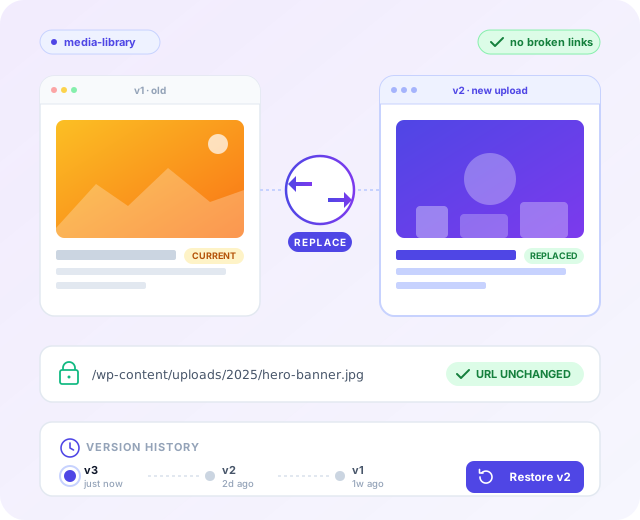
Replace WordPress Media Files
Swap any image, PDF, or file with a new version. Same URL, same filename, same publish date, so every link, embed, and theme reference keeps working. Uploaded the wrong one? Roll back through every previous version, one click per step.
How It Works
A faster admin in minutes
Every productivity tool lives in one Productivity tab inside WP Adminify. No config files to edit and no extra plugin per tweak.
From the WP Adminify Productivity tab
One panel, grouped toggles, changes apply on save.
Set it up in the right sequence
Work through the toggles this way for the fastest payoff.
Every setting is a single toggle, and every toggle is reversible. Nothing here touches WordPress core files.
Role-based control. Most plugins give one global switch.
A typical “hide clutter” plugin changes the admin for everyone.
WP Adminify lets you scope productivity changes by user role, so clients and admins each get the dashboard that fits them.
Your client and your admin don’t need the same dashboard.
A non-technical client is better off with a stripped-down admin: no Screen Options, no Help tab, a custom welcome widget instead of plugin noise. An administrator needs the full interface to manage and troubleshoot the site.
Apply productivity changes site-wide or by role. One blunt global switch forces a compromise. Role scoping gives clients a calm, focused dashboard while admins keep every control they rely on.
What you can scope by role
Comparison
WP Adminify vs single-purpose productivity plugins
How the Productivity tools compare with separate “hide notices,” “duplicate post,” and “dashboard widget” plugins, hand-written code, and default WordPress.
| Feature | WP Adminify | Single-Purpose Plugins | Manual / Code | Default WordPress |
|---|---|---|---|---|
| Hide & consolidate admin notices | ✓ Yes | ~ Separate plugin | ~ Fragile hooks | ✗ None |
| Remove welcome panel | ✓ Yes | ~ Separate plugin | ~ Custom code | ✗ Dismiss Only |
| Hide Screen Options & Help tabs | ✓ Yes | ✗ Rarely available | ~ Custom code | ✗ None |
| Duplicate posts, pages & CPTs | ✓ Yes | ~ Separate plugin | ✗ Very complex | ✗ None |
| Custom text / RSS / iframe widgets | ✓ Yes | ~ Separate plugin | ~ Code per widget | ✗ None |
| Role-based control | ✓ Yes | ✗ Separate plugin | ~ Capability checks | ✗ None |
| Managed from one settings panel | ✓ 60+ features in one | ✗ No | – | – |
| Replaces multiple plugins | ✓ Yes | ✗ Scattered | – | – |
Admin productivity without a plugin: the code approach
Every productivity tweak here is possible in code. Knowing the manual way shows what WP Adminify is doing under the hood, and why a toggle wins.
The code-only approach
Removing the welcome panel and a few default widgets, and hiding admin notices, in your theme’s functions.php:
// Remove the “Welcome to WordPress” panel remove_action( ‘welcome_panel’, ‘wp_welcome_panel’ );// Remove default dashboard widgets add_action( ‘wp_dashboard_setup’, function () { remove_meta_box( ‘dashboard_quick_press’, ‘dashboard’, ‘side’ ); remove_meta_box( ‘dashboard_primary’, ‘dashboard’, ‘side’ ); remove_meta_box( ‘dashboard_activity’, ‘dashboard’, ‘normal’ ); } );// Hide admin notices – a blunt, risky version add_action( ‘admin_head’, function () { remove_all_actions( ‘admin_notices’ ); remove_all_actions( ‘all_admin_notices’ ); }, 1 );This works until it doesn’t. remove_all_actions( ‘admin_notices’ ) is a sledgehammer: it hides genuine warnings along with the marketing. Add post duplication and custom widgets and the snippet keeps growing. Worse, it lives in your theme, so switching themes wipes every tweak.
Why the GUI approach wins
- Nothing to maintain across WordPress and theme updates.
- Role-based controls without writing capability checks by hand.
- Notices managed, not nuked: consolidated so real alerts still reach you.
- One-click revert: toggle a setting off instead of hunting through functions.php.
Not a Media Replace bug. Every WordPress media replacement tool runs into this. URL persistence is what makes the feature useful, and it’s also what makes caches sticky.

“The plugin is stable and does not affect performance, which is a significant advantage. ”

@gdimitrov
WordPress.org
“This plugin is very great: works fine, gives a very nice look to the WordPress Dashboard”

@peopleinside
WordPress.org
“This plugin lets me transform the UI, user-friendly, and fast, essential for a modern website backend.“

Sascha Donelasci
Web Design Agency
“Support has been responsive and helpful, truly putting the customer first” , a rare quality these days.

Louis J Gleason
Developer & Creator
“I am totally blown away with all that WPAdminify can do! ALREADY WAY BEYOND EXPECTATIONS!!”

@shezoom
Startup
“Lot of functionalities and ability to, customize admin & login on WordPress, active support & updates.”

@Myllio
WordPress.org
- Yearly
- Lifetime
Save Page
Save Page
Save Page
Save Bunlde Pricing Page
Save Page
Save Page
Save Page
Save Bunlde Pricing Page
Frequently Asked Question (FAQ)
Questions people actually ask about Dashboard Productivity
Get Started with WP Adminify Today
We offer the best WordPress Dashboard Customization and maintenance feature to our users.
Rebrand the admin panel of personal or clients Dashboard within minutes.