
TL;DR: The website field in WordPress comments is a spam magnet. Remove it in 2 minutes with WP Adminify (no coding) or 5 lines of code. Your SEO and comment quality will thank you.
Here’s Why Spammers Love Your Comment Form
You know those irrelevant comments with suspicious links that show up on your blog posts?
90% of them came through the website URL field in your comment form.
Spammers don’t care about your content. They care about one thing: getting a dofollow backlink from your site to theirs. And WordPress makes it easy for them by including a website field in every comment form by default.
The brutal reality:
- Spam comments hurt your SEO (Google sees excessive spammy outbound links)
- Negative reputation – visitors lose trust when they see spammy comments
- Wasted time – you spend hours moderating instead of creating content
- Security risk – some spam links lead to malware or phishing sites
The fix is simple: remove the website field from your comment form.
Your genuine commenters don’t need it. Your SEO doesn’t need it. But spammers? They desperately need it.
Take it away, and watch your spam comments drop by 80-90% overnight.
Two Ways to Remove the Website Field
You have two options:
- Plugin method (recommended): 2 minutes, zero coding, reversible
- Code method (advanced): 5 lines of PHP, requires functions.php access
If you’re not a developer, use the plugin method. It’s faster, safer, and you can undo it anytime.
Method 1: Remove Website Field with WP Adminify (No Coding)
WP Adminify has a Security module that gives you full control over comments – including the ability to remove the website field with one checkbox. The same module goes further when you need it to, so you can also hide the Comments menu from your admin panel and drop the section from your sidebar completely.
Step 1: Install and Activate WP Adminify
Go to Plugins → Add New in your WordPress dashboard.

Search for “WP Adminify”, install, and activate. The free version has everything you need for this.
Step 2: Navigate to Security Settings
Once activated, go to WP Adminify → Security in your WordPress dashboard.
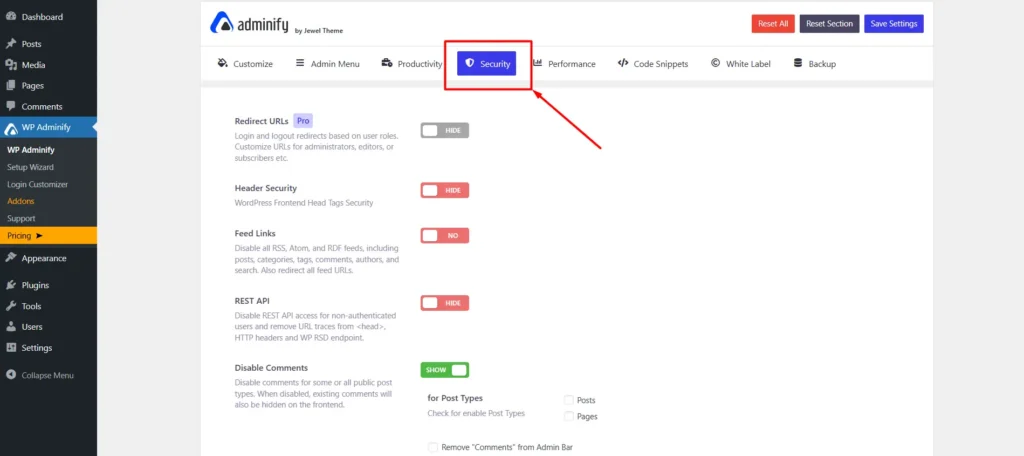
You’ll see all security-related options. Scroll down to the comments section.
Step 3: Enable “Remove Website Field”
Find the option labeled “Remove website Field (URL) from comment form template” and check the box.
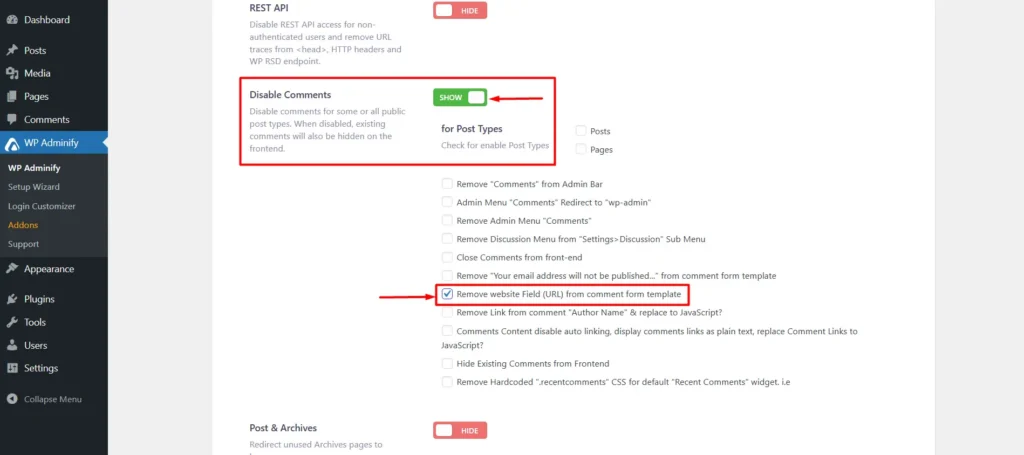
Click Save Settings at the top.
Done. Reload your site and check the comment form – the website field is gone.
Method 2: Remove Website Field Without Plugin (Code Method)
If you prefer code over plugins, add this snippet to your theme’s functions.php file or a site-specific plugin:
add_filter('comment_form_default_fields', 'remove_comments_url_field');
function remove_comments_url_field($fields) {
    if (isset($fields['url'])) {
        unset($fields['url']);
    }
    return $fields;
}
Where to add the code:
- Option A: Child theme’s
functions.php(recommended – survives theme updates) - Option B: Site-specific plugin (use Code Snippets or similar)
- Option C: Main theme’s
functions.php(not recommended – lost on theme update)
⚠️ Important: If you add code directly to your theme’s functions.php, it will be lost when you update the theme. Use a child theme or site-specific plugin to make it permanent.
What Happens After You Remove the Website Field?
Here’s what changes:
- ✅ Spam comments drop 80-90% – spammers can’t get their backlinks
- ✅ Comment quality improves – genuine users still comment normally
- ✅ SEO health improves – no more spammy outbound links hurting your ranking
- ✅ Less moderation time – spend time on content, not spam cleanup
What about existing comments? Old comments with website links stay as-is. This only affects new comments submitted after you make the change.
Got Questions About Removing the Website Field? Here Are the Answers
Final Thoughts
The website field in WordPress comments is a spam magnet. Removing it takes 2 minutes and saves you hours of moderation.
Quick recap:
- Install WP Adminify (free)
- Go to WP Adminify → Security
- Check “Remove website Field from comment form”
- Save settings
- Watch spam comments drop 80-90%
Your comment section will be cleaner, your SEO will be healthier, and you’ll spend less time fighting spam.
Need help? Drop a comment below if you run into issues. We’re here to help.
Want more WordPress tips? Check out our blog for guides on dashboard customization, white labeling, and plugin comparisons.